

Introduction
The e-commerce industry is growing rapidly, making 2025 an excellent time to start a Dropshipping Business. This model is beginner-friendly since it removes the need to stock inventory or manage shipping, as suppliers handle fulfillment. Entrepreneurs can instead focus on building their store, marketing products, and serving customers. Dropshipping is appealing because it is low-risk, cost-effective, and scalable, allowing businesses to expand quickly without heavy upfront costs. Accessibility is another major advantage; anyone can start with minimal investment and reach global markets. Platforms like WordPress and WooCommerce make setting up an online store simple, even without technical expertise.
Whether you want a side hustle or a full-time eCommerce brand, dropshipping provides the flexibility, affordability, and growth opportunities to succeed in the digital marketplace.
If you are here For WordPress Themes then don't worry You can also choose from Our variety of Premium WordPress Themes tailored for 100+ Niches and Businesses.
What is a Dropshipping Business?
Dropshipping with WordPress is an e-commerce model where you sell products online without keeping them in stock. Instead of buying and storing inventory, you partner with suppliers or manufacturers who handle product storage, packaging, and shipping directly to your customers.
How to Start a Dropshipping Business in 2025
Step 1: Set Up Hosting & Install WordPress
The first step to start a dropshipping business with WordPress is setting up reliable hosting and installing the WordPress platform. After installing WordPress, your hosting choice forms the foundation of your store, so pick a provider offering speed, uptime, and strong support. Popular options like Bluehost, SiteGround, or Hostinger are budget-friendly and optimized for WordPress. Once hosting is selected, register a memorable domain name that reflects your brand. Most hosts provide a one-click WordPress installer, making setup quick and beginner-friendly. Be sure to activate SSL (https) for secure transactions and customer trust. After installation, log in to your WordPress dashboard to manage your site’s settings and content.
At this stage, your website is live with a basic structure, prepared for customization, WooCommerce installation, and dropshipping tools, forming the essential groundwork to start a dropshipping business successfully.
Step 2: Install WooCommerce
After setting up WordPress, the next crucial step to start a dropshipping business is installing WooCommerce to turn your site into a complete online store. WooCommerce is a free plugin that integrates smoothly with WordPress and offers all the tools needed to start selling. To install, go to your WordPress dashboard, navigate to Plugins > Add New, search for “WooCommerce,” then click Install Now and Activate. Once activated, a setup wizard guides you through essential configurations like store location, currency, product types, shipping methods, and payment gateways. For dropshipping, it’s recommended to enable multiple payment options such as PayPal, Stripe, or Razorpay (for Indian users) to ensure flexibility. WooCommerce also lets you set up shipping zones, tax rates, and order confirmations.
At this point, your site becomes eCommerce-ready and can be enhanced with extensions and add-ons tailored to optimize and scale your dropshipping business.
Step 3: Add Your WordPress Theme
After installing WooCommerce, the next step in how to start a dropshipping business is adding a theme to define your store’s design and user experience. A theme controls layout, fonts, colors, and responsiveness across devices. To add one, go to Appearance > Themes > Add New in your WordPress dashboard, then select a free option or upload a premium theme you’ve purchased. Once installed, click Activate to apply it. Next, customize the theme by navigating to Appearance > Customize, where you can adjust branding elements like your logo, header, footer, typography, and color scheme. Ensure the design is mobile-friendly since many dropshipping customers shop via smartphones. A clean, well-structured theme builds trust, enhances navigation, and improves conversions.
By choosing and customizing the right theme, you’ll create a professional-looking store that reflects your brand identity while delivering a seamless shopping experience for customers, an essential step when you start a dropshipping business.
1. Dropshipping WordPress Theme

The Dropshipping WordPress Theme by VW Themes is a modern, versatile, and user-friendly eCommerce solution tailored for entrepreneurs aiming to launch or scale an online business effortlessly. Designed specifically for dropshipping, it integrates smoothly with WooCommerce, simplifying product management, payments, and shipping. Its mobile-first, professional design ensures a visually appealing store on all devices, enhancing customer trust and conversions. Elementor compatibility allows easy page building without coding, and pre-designed templates cater to niches like fashion, electronics, home décor, and beauty. Fast-loading and SEO-optimized, the theme improves performance and visibility. Key features include product filtering, multi-currency support, smart search, wishlist, and newsletter integration, covering all essential eCommerce needs. Lightweight, translation-ready, and regularly updated, it provides flexibility and scalability.
With premium support, this theme suits both beginners and experienced sellers, offering a complete toolkit for creating a professional, high-performing dropshipping store.
WordPress Ecommerce Theme

The WordPress Ecommerce Theme is a premium, versatile solution ideal for building high-performing online stores, especially suited for dropshipping businesses. Whether launching an apparel, gadget, accessory, or grocery delivery store, the theme adapts seamlessly to various business models. Fully WooCommerce-compatible, it enables easy product management, secure checkout, and a smooth shopping experience, crucial for dropshipping success.
Its retina-ready design, extensive customization options, translation readiness, and SEO optimization ensure a professional appearance while reaching a global audience effectively. Fast page load times, secure coding, and a fully responsive layout provide reliability and user trust. Key features like product showcases, testimonial sections, and call-to-action elements are thoughtfully crafted to boost conversions and engage customers. Designed for both novice and experienced store owners, this theme combines aesthetic appeal with functional performance. For entrepreneurs serious about launching or scaling their dropshipping store, it represents a smart, long-term investment in success.
Multivendor Marketplace WordPress Theme

The Marketplace WordPress Theme is a premium, multipurpose solution ideal for entrepreneurs, dropshippers, and multi-vendor businesses seeking a professional online presence. Perfect for stores selling interiors, jewelry, fashion, or baby products, it combines a clean design with powerful functionality. Built with Elementor, the theme allows easy customization for beginners while offering advanced options for professionals. Fully responsive and cross-browser compatible, it ensures smooth navigation on all devices.
With WooCommerce support, managing products, payments, and vendors becomes effortless. Key features include advanced color options, over 100 fonts, customizable layouts, sticky headers, sliders, and product category listings, enabling a unique storefront. SEO optimization enhances search engine visibility, and translation-ready functionality broadens global reach. Regular updates, excellent support, and user-friendly customization tools make this theme a comprehensive solution for building a standout dropshipping marketplace that grows efficiently and professionally.
Step 4: Install a Dropshipping Plugin
To start a dropshipping business efficiently, using a dedicated plugin with WooCommerce is essential. Plugins like AliDropship, Spocket, DSers, WooDropship, and Syncee simplify product import, inventory syncing, and order fulfillment. AliDropship specializes in importing from AliExpress, while Spocket provides access to US and EU suppliers for quicker shipping. Installation is easy, just go to Plugins > Add New, search for your preferred plugin, then install and activate it. Once set up, these tools let you explore supplier catalogs, import products with one click, and automatically update pricing and stock. They also streamline order fulfillment by sending customer details directly to suppliers, minimizing manual work and errors.
This automation saves time, improves accuracy, and ensures smooth store management, making it easier to start a dropshipping business without being overwhelmed by backend operations.
Step 5: Add Products
After setting up your WooCommerce Dropshipping Plugin, the next step to start a dropshipping business is adding products to your store. Browse your supplier’s catalog within the plugin and import items into WooCommerce with a single click, including descriptions, pricing, and images. While this saves time, it’s important to customize product details for originality and SEO. Rewrite descriptions to emphasize unique benefits, adjust titles with relevant keywords, and refine images for a cohesive brand appearance. For added authenticity, consider ordering samples and using your own product photos. Organize products into clear categories and add tags to improve navigation and search visibility. When setting prices, factor in shipping, supplier costs, and profit margins to ensure competitive yet profitable listings.
A carefully curated product selection, presented with professionalism and consistency, helps build customer trust and significantly boosts your chances of turning visitors into loyal buyers.
Step 6: Configure Payments & Shipping
Configuring payments and shipping in WooCommerce is essential when you start a dropshipping business, as it ensures smooth transactions and customer trust. Set up popular gateways like PayPal, Stripe, or Razorpay (for Indian merchants) to give buyers flexible options, reducing cart abandonment and boosting sales. Next, adjust shipping settings under WooCommerce > Settings > Shipping. Depending on supplier terms, you can offer flat-rate, free, or real-time calculated shipping rates. Always be transparent by displaying estimated delivery times, usually 7–15 days for dropshipping. If your plugin supports automation, configure shipping rules to streamline operations. Consider strategies like a free shipping coupon for WooCommerce on orders above a certain value to encourage higher purchases.
Clear, customer-friendly policies not only prevent confusion and refunds but also enhance the overall shopping experience, making your store more reliable and appealing to customers.
Step 7: Optimize Your Store
Optimization ensures your dropshipping store performs efficiently, loads quickly, and is prepared to attract and convert customers. To properly start a dropshipping business, begin by installing essential plugins for performance and SEO, such as Yoast SEO or Rank Math. For speed, use caching tools like LiteSpeed Cache or WP Rocket, and connect analytics through Google Analytics for WordPress via Site Kit or MonsterInsights. Boost conversions with plugins like TrustPulse for social proof and review tools to display customer feedback. Beyond plugins, focus on credibility by creating essential legal pages like Privacy Policy, Terms of Service, Refund Policy, and Shipping Policy. Use high-quality images, original product descriptions, and clear calls-to-action to build trust.
A fast, professional, and SEO-optimized store ranks higher in search results, keeps visitors engaged, reduces bounce rates, and increases sales.
Step 8: Market Your Store
Once your dropshipping store is live, the next focus when you start a dropshipping business is driving traffic through effective marketing. Begin by creating engaging social media content on platforms like Instagram and Pinterest using lifestyle images, reels, and short videos to showcase products. For faster results, run small-budget Facebook and Google Shopping ads to test which products and audiences perform best. Alongside this, build a content marketing strategy for SEO by publishing niche-related blog posts to attract organic traffic and establish authority. Email marketing is equally important; set up tools like FluentCRM or MailPoet to send welcome sequences, abandoned cart reminders, and promotional offers.
Combining organic and paid strategies ensures consistent visibility, short-term sales, and long-term growth.
Step 9: Manage Orders & Customers
Running a successful dropshipping store depends on efficient order management and strong customer support. When you start a dropshipping business, WooCommerce and your dropshipping plugin make order syncing with suppliers seamless. Once a customer buys, you only confirm details while the supplier handles packing and shipping. Always track shipments to keep customers informed about delivery status.
Equally important is customer support, which responds quickly to questions about shipping, products, or returns. Tools like live chat or helpdesk plugins enable faster communication. Ensure refund, exchange, and delay policies are clear and easy to find, as transparency reduces complaints and sets expectations. Handling post-purchase interactions well builds trust, loyalty, and positive experiences, which not only encourage repeat sales but also bring valuable reviews and word-of-mouth referrals.
Step 10: Scale Your Dropshipping Business
Once your store is launched and you’ve made initial sales, the next step is scaling for growth and profitability. At this stage of how to start a dropshipping business, begin by reviewing sales reports to identify top-performing products and allocate more ad spend to those winners. Work with suppliers to secure better prices, faster shipping, and branded packaging to enhance customer experience and strengthen brand identity. Strategically expand your catalogue with complementary items that appeal to existing buyers, while implementing email marketing campaigns to drive repeat purchases and customer loyalty.
As your business matures, explore private labeling to differentiate your brand in a competitive market. Remember, scaling isn’t about adding products randomly; it’s about optimizing campaigns, automating processes, and improving every aspect of your operations to build a sustainable, long-term dropshipping business.
VWThemes WP Theme Bundle offers a collection of premium WordPress themes designed for various niches, ensuring responsive design, SEO optimization, and user-friendly customization. It’s a cost-effective solution for creating multiple professional websites with ease.
Conclusion
Starting a dropshipping business in 2025 is a practical way to enter e-commerce with minimal investment and low risk. By leveraging global suppliers, entrepreneurs can launch online stores without handling inventory or logistics. Setting up with WordPress, WooCommerce, a suitable theme, and a dropshipping plugin creates a professional platform ready to attract customers. However, long-term success depends on more than setup; it requires effective marketing, strong customer service, and ongoing optimization to stand out in a competitive market. As your store grows, scaling through proven products, better supplier relationships, and branding opportunities helps ensure sustainability. With dedication and smart strategy, dropshipping in 2025 can evolve from a simple startup idea into a profitable and scalable online business model.
Blogs Categories
Podcast WordPress Theme (Audio Podcast 2.0)

Latest WordPress Themes


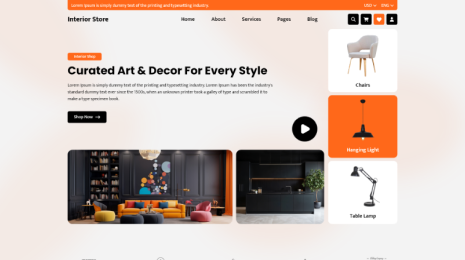




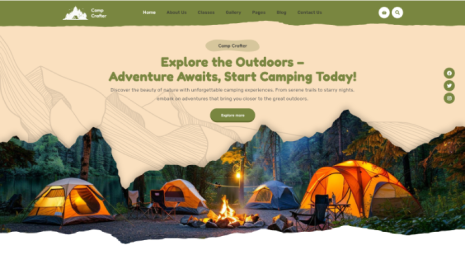
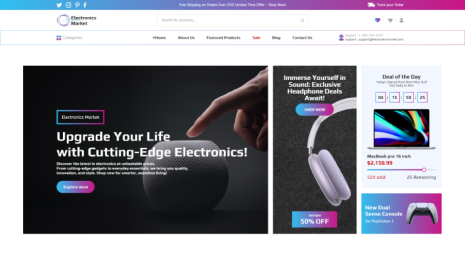


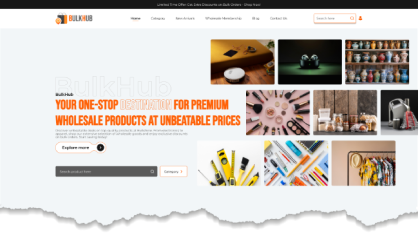



Buy All our Premium Themes just at $119
