

In a fast-paced digital world, convenience is everything. Customers no longer want to call or email to book a car rental, they expect an easy online process that works anytime, anywhere. This is where a car rental booking system for WordPress becomes essential. Whether you’re running a small local rental business or managing a large fleet, integrating a booking solution into your website can help you automate reservations, manage cars efficiently, and provide a seamless experience to your customers.
WordPress, being the world’s most popular content management system (CMS), makes this process simple. With dedicated plugins and themes, you can transform your site into a fully functional car rental platform. From real-time availability checks to secure online payments, everything can be managed from one dashboard. Using premium WordPress themes ensures your site looks professional, functions seamlessly, and provides a great user experience.
In this blog, we’ll explore why a car rental booking system matters, its key features, the best plugins and themes available, and a step-by-step guide to enabling one on your WordPress website.
Why You Need a Car Rental Booking System
Running a car rental business without an online booking solution can limit growth and customer satisfaction. Here’s why implementing a car rental booking system for WordPress is crucial:
- Convenience for Customers: Your customers can browse available vehicles, compare prices, and book instantly, without phone calls or emails.
- 24/7 Reservations: An automated system lets people book cars anytime, even outside of office hours, helping you capture more business opportunities.
- Real-Time Vehicle Availability: No more double bookings or confusion. A system shows which vehicles are available and when.
- Streamlined Operations: Manage bookings, payments, and vehicle schedules in one place. This saves time and reduces errors.
- Builds Trust and Professionalism: A professional booking system makes your business look more credible, encouraging customers to choose you over competitors.
Key Features of a Car Rental Booking System for WordPress
- Vehicle Management: Easily add, edit, and categorize vehicles with details like model, price, availability, and images.
- Online Payment Integration: Online Payment Integration: Support for secure payment gateways like PayPal, Stripe, and WooCommerce ensures smooth and reliable transactions, enhancing customer trust and convenience. Integrating a secure payment gateway not only protects sensitive financial data but also boosts credibility, making your website more professional and user-friendly.
- Custom Booking Forms: Allow customers to select vehicle type, pick-up location, rental period, and additional services.
- Real-Time Scheduling & Calendar View: Track bookings with an intuitive calendar, reducing conflicts and improving organization.
- Mobile-Friendly Design: Most users book rentals on smartphones, your system should be fully responsive.
- Multi-Location Support: If your business operates in multiple cities or branches, customers can select their preferred pick-up and drop-off points.
- Coupons & Discounts: Offer promotional codes and discounts to attract customers.
- Email & SMS Notifications: Automatically confirm bookings and send reminders to customers and admins.
Best Plugins & Themes for Car Rental Booking
One of the biggest advantages of WordPress is its ecosystem of plugins and themes. Here are some of the best options to create a car rental booking system for WordPress:
1. VikRentCar Car Rental Management System ( Plugin )
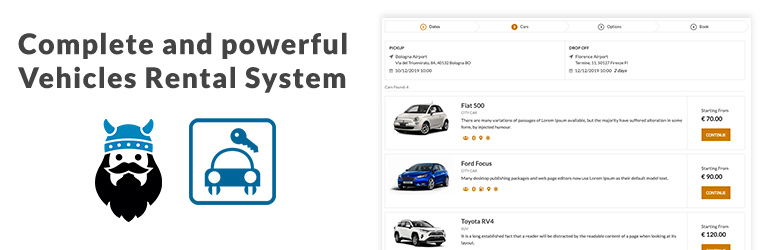
VikRentCar Car Rental Management System is a powerful car rental booking system for WordPress designed for businesses offering cars, scooters, bikes, boats, or any type of vehicle rental. Originally launched in 2008 for another CMS, Vik Rent Car quickly became a trusted solution worldwide, and now it’s available as a native WordPress plugin.
The free version offers flexible pricing models, custom rate plans, vehicle management, booking calendars, order management tools, and customizable front-end booking options. With 8 different views and shortcode support, it works seamlessly with any WordPress theme. Additionally, it includes multi-language support, allowing you to create a truly multilingual WordPress website that caters to global audiences. Its feature-rich back-end makes it ideal for both beginners and professionals looking to manage bookings efficiently.
Upgrade to the Pro version for advanced features like seasonal pricing, restrictions, extra services, coupons, customer management, payment gateways, and detailed statistics. Whether you’re a rental company, agency, or freelancer building client websites, VikRentCar is the complete solution to manage reservations and grow your business.
2. Car Rental Manager for WordPress – Online Vehicle Booking System ( Plugin )
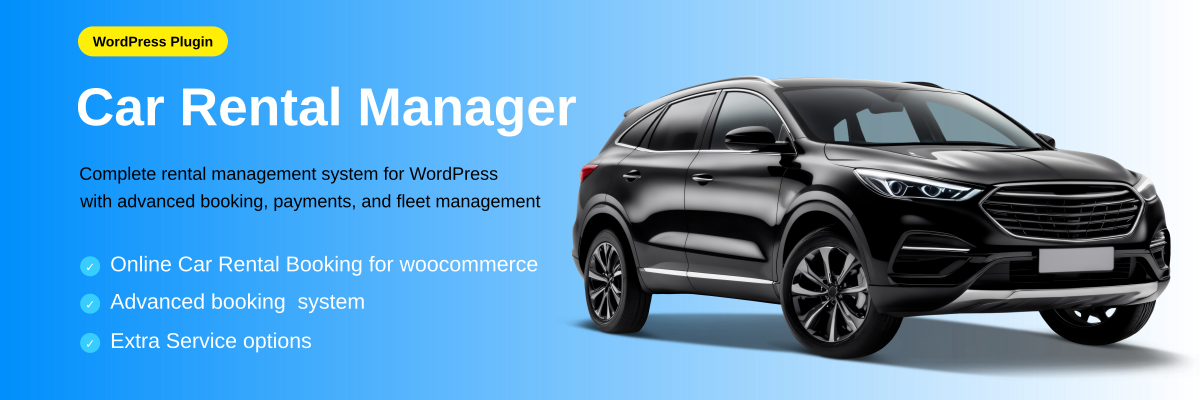
Car Rental Manager for WordPress is a free and powerful plugin that allows you to set up a complete car rental booking system for WordPress in just a few steps. Whether you rent cars, vans, scooters, or other vehicles, this plugin simplifies and streamlines your rental operations directly from your website.
It integrates seamlessly with WooCommerce, ensuring a secure and smooth booking process for customers. Key features include effortless setup, advanced booking controls, recurring rentals, and detailed vehicle management with real-time availability calendars. Flexible pricing options like tiered discounts, day-wise rates, and seasonal pricing give you the freedom to adapt to any market. Additionally, it supports features like the WooCommerce auto apply coupon, allowing you to automatically offer discounts or special deals during checkout to enhance conversions and customer satisfaction.
With shortcode support, multilingual readiness, and responsive design, you can easily customize the booking experience and reach customers worldwide. Start with the free version or upgrade to Pro for advanced tools like PDF export and enhanced form support, all accessible from your WordPress dashboard.
3. Taxi Service WordPress Theme by VW Themes ( Theme )

The Taxi Service WordPress Theme is a modern, professional, and fully responsive solution designed for taxi, cab, and transportation businesses. With an elegant and user-friendly interface, it allows visitors to book rides, request appointments, and explore services seamlessly. The theme features customizable sections for showcasing services, team members, client testimonials, and new arrivals, making it perfect for building trust and credibility with potential customers. Its clean design and clear layout ensure that all important information, including contact details, service hours, and email addresses, is easily accessible. Integrated newsletter and social media options enhance customer engagement, while attractive call-to-action buttons like “Buy Now” or “Request Appointment” help drive conversions.
The theme also highlights beautiful designs for service sections, client reviews, and sponsor logos, offering a polished look for your website. Overall, the Taxi Service WordPress Theme combines functionality, style, and convenience, providing an ideal platform to grow your taxi business online. This makes it a perfect resource for anyone following a guide to WordPress for small business websites, helping entrepreneurs establish a professional and effective online presence.
Step-by-Step Guide: How to Enable Car Rental Booking in WordPress
Step 1: Install WordPress and Choose a Theme

Start by installing WordPress on your hosting server. Choose a reliable hosting provider that supports fast loading and SSL for secure transactions. Once installed, select the Taxi Service WordPress Theme by VW Themes, which is perfect for transportation and rental businesses.
This theme comes with pre-built pages like “Fleet,” “Booking,” and “Contact,” making it ideal for creating a car rental booking system for WordPress. Customize the theme with your logo, brand colors, and layout. Its mobile-friendly design ensures customers can book vehicles from any device, giving your website a professional and user-friendly experience.
Step 2: Install a Car Rental Plugin

After setting up the theme, install a dedicated plugin to power your car rental booking system for WordPress. Two top options are VikRentCar – Car Rental Management System and Car Rental Manager for WordPress – Online Vehicle Booking System.
These plugins handle fleet management, booking schedules, and online payments without coding. Configure vehicle categories, rental durations, booking forms, and notifications. Both plugins allow you to customize the booking workflow to meet your business needs, making your car rental booking system for WordPress efficient and customer-friendly. They are excellent examples of free WordPress plugins that add powerful functionality to your site without additional cost.
Step 3: Configure Cars and Pricing

Add all your vehicles to the system to fully set up your car rental booking system for WordPress. Include images, descriptions, seating capacity, and rental rates (per hour or per day). Categorize cars by type, economy, SUV, and luxury, to make searching easier. Set availability schedules and optional add-ons like GPS, insurance, or child seats.
Some plugins also allow seasonal pricing or discounts for long-term rentals. Properly configuring vehicles ensures your car rental booking system for WordPress runs smoothly, avoids double bookings, and reflects your actual fleet.
Step 4: Set Up Payment Gateways

Enable secure online payments to complete your car rental booking system for WordPress. popular payment gateways PayPal, Stripe, or WooCommerce integration. Configure currency, tax, and refund policies. Test each payment method by making trial bookings to ensure transactions process correctly. Secure payments enhance customer trust and professionalism.
Offering multiple payment options in your car rental booking system for WordPress can increase conversion rates and make it convenient for different customer preferences.
Step 5: Test the Booking Process

Before going live, thoroughly test your car rental booking system for WordPress. Complete the entire booking process as a customer: select a vehicle, choose dates, enter details, and make a payment. Check that availability, pricing, and notifications work correctly. Confirm that emails or SMS messages are sent as expected.
Testing ensures your car rental booking system for WordPress delivers a smooth user experience and prevents potential issues after launch. Optimize for both desktop and mobile users for maximum convenience.
Tips to Optimize Your Car Rental Website
Even after setting up your car rental booking system for WordPress, optimizing your site is crucial to maximize conversions.
- Use SEO-Friendly Content: Incorporate keywords such as “car hire,” “vehicle rental,” and location-based terms to improve your ranking.
- Enable Reviews & Testimonials: Positive reviews build trust and encourage new bookings.
- Optimize for Speed: A fast-loading website improves user experience and search rankings.
- Integrate Google Maps: Show pick-up and drop-off locations clearly for customer convenience.
Offer Multiple Payment Options: More payment flexibility increases booking chances.
Conclusion
A car rental booking system for WordPress is a game-changer for rental businesses. It simplifies operations, improves customer satisfaction, and helps you scale faster. With the right plugins and themes, you can turn a simple WordPress site into a fully functional rental platform, especially when paired with a wp theme bundle for seamless design and functionality.
Whether you’re just starting or already running a car rental business, enabling online booking will put you ahead of competitors who still rely on manual reservations. From real-time vehicle availability to secure online payments, the benefits are too significant to ignore.
Now is the time to invest in a booking solution that works for your business. Set up your system, optimize your website, and start welcoming more customers with ease.
Blogs Categories
Podcast WordPress Theme (Audio Podcast 2.0)

Latest WordPress Themes













Buy All our Premium Themes just at $119
