

Migrating a WordPress website can feel intimidating, especially if you’re worried about losing data, breaking links, or facing downtime. Whether you’re changing your hosting provider, moving from a local setup to a live site, or shifting to a new domain, having the right migration tool can make the process smooth and stress-free. Fortunately, several powerful WordPress migration plugins make it possible to transfer your entire site, including files, themes, plugins, and databases, with just a few clicks.
These plugins handle everything automatically, from updating URLs to securing backups, saving you hours of manual work. Many also offer cloud integrations, staging environments, and automated scheduling for added convenience. In this blog, we’ve compiled the best WordPress migration plugin options to help you move your website safely, quickly, and without downtime, whether you’re a beginner, developer, or business owner. Pairing the right migration tool with premium WordPress themes can further enhance your site’s performance, design, and user experience after migration. Let’s explore which one best fits your needs.
Plugin Comparison Table
|
Plugin Name |
Free/Premium |
Key Features |
Best For |
|
UpdraftPlus |
Free + Premium |
Auto backup, 1-click restore |
Beginners & bloggers |
|
All-in-One WP Migration |
Free |
Drag & drop migration |
All users |
|
WPvivid |
Free |
Backup + staging |
Developers |
|
BackupBuddy |
Premium |
ImportBuddy tool |
Businesses |
|
Super Backup & Clone |
Premium |
Multisite migration |
Agencies |
|
BackupGuard |
Premium |
Selective table migration |
Beginners |
6 Best WordPress Migration Plugins
1. UPdraftPlus ( Free )

UpdraftPlus Backup & Migration Plugin is a trusted solution for millions of WordPress users worldwide. It allows you to easily back up, restore, and migrate your WordPress website with just a few clicks. UpdraftPlus supports backups to popular cloud services like Google Drive, Dropbox, Amazon S3, and more, while the premium version adds OneDrive, Azure, and UpdraftVault options. You can schedule automatic wordpress backup every few hours, daily, weekly, or monthly, ensuring your website data is always safe.
When things go wrong, whether it’s a hack, update error, or server crash, UpdraftPlus helps you quickly restore your site to a previous version. Migration is simple too: transfer your entire site to a new host or domain effortlessly with its built-in search-and-replace feature that prevents broken links. With its reliability, flexibility, and ease of use, UpdraftPlus stands out as the best WordPress migration plugin for secure, seamless website management.
Key Features:
- Automated Backups: Schedule backups hourly, daily, weekly, or monthly for hands-free protection.
- One-Click Restore & Migration: Easily move your site or recover from crashes with a single click.
- Cloud Storage Support: Backup directly to Google Drive, Dropbox, Amazon S3, and more.
- Search & Replace Tool: Automatically updates URLs during migration to avoid broken links.
2. All-in-One WP Migration and Backup ( Free )

All-in-One WP Migration and Backup is a powerful and trusted tool for effortlessly migrating and backing up WordPress websites. Since 2013, it has been the go-to solution for over 60 million sites worldwide, from small blogs to large enterprises like NASA and Harvard. With its simple drag-and-drop interface, similar to what you’d find in the best drag and drop website builder, users can export and import complete websites including databases, themes, plugins, and media, without downtime or technical hassles. It supports all major hosting providers and databases like MySQL, MariaDB, and SQLite. Advanced features include selective content migration, find-and-replace options, and WP-CLI support for automation.
The plugin also integrates with top cloud storage platforms like Google Drive and Dropbox. Regular bi-weekly updates ensure security and compatibility with the latest WordPress versions. Its reliability, accessibility, and enterprise-grade performance make All-in-One WP Migration and Backup the best WordPress migration plugin for users seeking seamless, secure, and efficient website transfers.
Key Features:
- Drag-and-Drop Migration: Export and import your full site, including database, themes, and plugins.
- Wide Hosting Compatibility: Works seamlessly with all major hosting providers and databases.
- Cloud Integration: Supports Google Drive, Dropbox, and more for convenient backup storage.
- Regular Updates: Bi-weekly updates ensure stability and compatibility with WordPress versions.
3. Migration, Backup, Staging – WPvivid Backup & Migration ( Free )
WPvivid Backup & Migration is a powerful, all-in-one solution for backing up, migrating, and staging WordPress websites with ease. Designed for both beginners and developers, this plugin allows you to create complete or partial backups, schedule automatic backups, and store them securely on popular cloud platforms like Google Drive, Dropbox, Amazon S3, and OneDrive.
With one-click migration, you can seamlessly move your website to a new domain or server without technical hassle. The built-in staging feature lets you test updates, plugins, and design changes safely in a subdirectory before going live. Plus, advanced options like incremental backups, database encryption, and multisite support make it ideal for managing multiple websites. Whether you’re running a personal blog or a large business site, WPvivid delivers reliable performance and flexibility, making it one of the best WordPress migration plugin options for secure and effortless website management.
Key Features:
- Complete & Partial Backups: Back up your entire site or select specific files and databases.
- One-Click Migration: Effortlessly transfer your website between domains or servers.
- Staging Environment: Safely test updates and design changes before going live.
- Advanced Security: Includes incremental backups, encryption, and multisite support.
4. Backup Buddy ( Premium- Pricing starts at $80/Year)
BackupBuddy, developed by iThemes, is a comprehensive solution for website backup, restoration, and migration. Known for its reliability, this plugin lets you easily create and download a complete backup of your WordPress site, including themes, plugins, media, and databases. It’s especially useful when you need to migrate your website or move it from a local server to a live one. The plugin’s ImportBuddy tool automatically manages URL and file path updates, ensuring your site functions seamlessly after migration. BackupBuddy also supports staging environments, allowing you to safely test updates or new features before deployment. Its automated URL replacement feature is ideal when changing domains, as it updates all old links across your database instantly.
Whether you’re moving a small blog or a large business website, BackupBuddy simplifies the process, making it one of the best WordPress migration plugin options for professionals and beginners alike.
Key Features:
- Full Site Backups: Protect your themes, plugins, and database with scheduled or manual backups.
- ImportBuddy Tool: Automatically handles URL and file path changes during migration.
- Staging Support: Test updates or redesigns in a secure staging environment.
- Automated URL Replacement: Instantly updates domain or permalink changes post-migration.
5. Super Backup & Clone – Migrate for WordPress ( Premium- Available for $35 for a single site)

Super Backup & Clone – Migrate for WordPress is a premium plugin available exclusively on CodeCanyon, offering a smooth and intuitive interface that makes website migration effortless. Designed for both beginners and professionals, it provides powerful options for instant WordPress migration, allowing you to move your website data seamlessly between servers or domains.
With features like multisite to single-site and single-site to multisite migrations, this plugin ensures complete flexibility for managing complex WordPress setups. You can also import backups from multiple destinations, including Dropbox, Google Drive, Amazon S3, or your local server, giving you complete control over your backup management. One standout highlight is custom migration, which lets you choose exactly what to transfer, saving time and resources. While it doesn’t have a free version, its premium reliability and advanced functionality make it one of the best WordPress migration plugin choices for professionals seeking total migration control and flexibility.
Key Features:
- Flexible Migration Options: Supports multisite to single-site and vice versa migrations.
- Instant Site Transfers: Move your website data quickly between servers or domains.
- Cloud Import/Export: Sync with Google Drive, Dropbox, Amazon S3, and local servers.
- Custom Migration Control: Choose specific data to migrate for faster, efficient transfers.
6. BackupGuard ( Premium- comes at $25 for 2 sites for a lifetime)
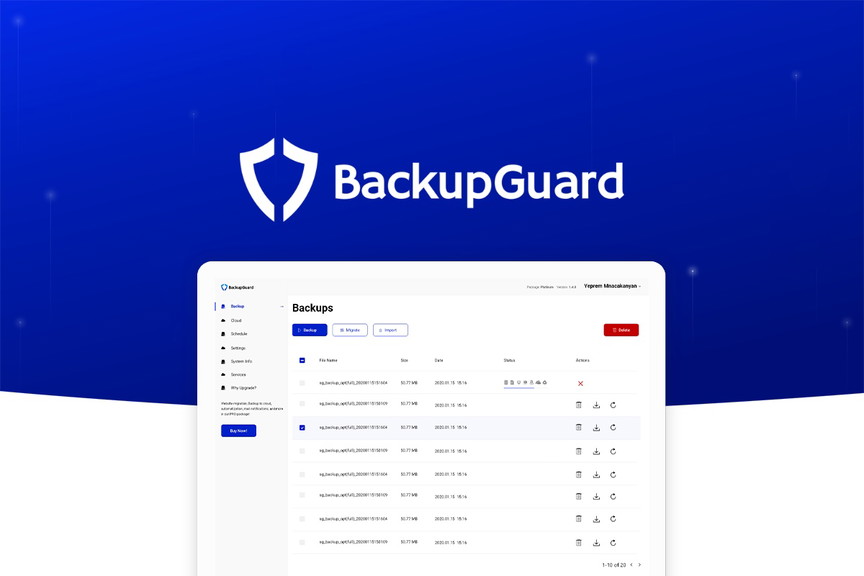
BackupGuard is a reliable WordPress plugin designed primarily for backups but also functions efficiently as a migration tool. Its clean and intuitive interface makes it ideal for beginners who want a straightforward way to move their website without complex setup. With BackupGuard, you can perform fast WordPress file and database migrations while maintaining full compatibility with all hosting providers. It also automatically redirects website URLs and updates serialized data during the migration process, ensuring seamless transitions. Pairing BackupGuard with the fastest WordPress themes can further enhance site performance after migration, ensuring quick load times and a smooth user experience.
A standout feature is its ability to migrate custom tables selectively, giving users more control. It supports three types of migrations, from local to live servers, subdirectory to root, and domain-to-domain or host-to-host transfers. However, the plugin has a 32 MB import limit, and there’s no free version available. Despite this, BackupGuard remains a solid option for those seeking simplicity and control, earning its place among the best WordPress migration plugin choices.
Key Features:
- Simple Migration Process: Ideal for beginners with a clean, user-friendly interface.
- Selective Table Migration: Migrate specific database tables for better control.
- Automatic URL Redirection: Adjusts URLs and serialized data during migration.
- Multi-Type Migration: Supports domain-to-domain, host-to-host, and local-to-live transfers.
Tips for a Smooth Migration
- Take a Full Backup: Always create a complete backup of your website files and database before starting the migration. This ensures you can restore your site if something goes wrong.
- Check Compatibility: Make sure your WordPress version, themes, and plugins are compatible with the migration tool you plan to use.
- Disable Caching & Security Plugins: Temporarily deactivate caching or firewall plugins during migration to prevent conflicts or incomplete transfers.
- Use a Staging Environment: Test your migration on a staging site first to catch issues before going live.
- Test After Migration: Verify that all pages, links, images, and contact forms work properly after the transfer.
- Update Permalinks & Clear Cache: Once the migration is complete, reset your permalinks and clear browser/server caches for smooth navigation.
Performance & Security Considerations
When migrating a website, performance and security should never be overlooked. A reliable WordPress migration plugin ensures that your files and database are transferred securely without corruption or unauthorized access. Many top tools, like WPvivid and BackupBuddy, include built-in database encryption, SSL compatibility, and serialized data handling to maintain site integrity. Using website security checkers alongside your migration process can help detect vulnerabilities, ensure clean transfers, and protect your website from potential threats during and after migration.
It’s also important to verify that your chosen plugin supports large file transfers and offers incremental backups to reduce server strain during migration. Regular plugin updates and developer support further enhance safety and compatibility with the latest WordPress versions. By choosing a trusted plugin with proven reliability and robust security measures, you can ensure your site performs optimally and remains fully protected throughout the migration process.
Conclusion
Choosing the best WordPress migration plugin ultimately depends on your website’s size, complexity, and technical needs. If you prefer an easy-to-use and reliable tool, UpdraftPlus and All-in-One WP Migration are great free options for beginners. For developers or business owners who need advanced features like staging, multisite support, or automated backups, WPvivid, BackupBuddy, and Super Backup & Clone offer excellent flexibility and control.
Each plugin on this list is built to make your site transfer smooth, secure, and downtime-free. Whether you’re moving hosts, updating your domain, or creating a staging site, these plugins help you manage the process effortlessly. Investing time in selecting the right migration solution ensures your website remains stable and accessible, no matter where it’s hosted. Pairing the right migration tool with a WP Theme Bundle can further enhance your site-building process, helping you relaunch or redesign your website with ease. With the right tool, migrating your WordPress site can be faster, safer, and completely hassle-free.
Blogs Categories
Podcast WordPress Theme (Audio Podcast 2.0)

Latest WordPress Themes













Buy All our Premium Themes just at $119
